Thinking of moving from Cloudways to Hostinger?
If you’re comparing Cloudways vs Hostinger, I understand the hesitation. Changing hosting is never a small decision, especially when you are managing client websites, business websites, or multiple WordPress installs.
I used Cloudways for almost a decade. For many years, it worked well for me. But as more client websites grew and needed more resources, the costs increased and server issues started taking up too much of my time.
In 2025, I decided to move to Hostinger Cloud Hosting.
If you want to check the current plans before reading further, you can view Hostinger pricing here (You will enjoy up to additional 20% discount with the affiliate link when there’s no mega sales like Summer Sales or Black Friday).
This post is my personal experience after making that switch. I’ll share why I left Cloudways, what improved, what problems I still faced with Hostinger, and whether I think moving over is worth it.
My background with Cloudways and DigitalOcean
Before I talk about Hostinger, I think it helps to explain where I’m coming from.
I was a Cloudways user for almost 10 years. I used the setup for both my own websites and client projects. In the beginning, it made a lot of sense. It was flexible, familiar, and good enough for smaller sites with moderate traffic.
At that stage, I was only hosting a few sites, and most of them had relatively low usage. So the cost was manageable and the setup felt worth it.
But things changed as the websites grew.
Why I moved from Cloudways to Hostinger
The main reason was cost.
Cost matters to every website owner, but it becomes even more important when you’re managing more sites and supporting clients whose businesses are growing. At some point, I started noticing that the hosting setup was becoming harder to justify.
Cloudways was fine when traffic was lower and resource demands were simpler. But as usage increased, I kept running into server resource issues. Websites needed more room to breathe, and that meant higher monthly costs.
To keep my hosting cost under USD $60 per month, I eventually moved a few websites to DigitalOcean + RunCloud instead.
On paper, that sounded like a better solution.
In reality, it did not help as much as I hoped.
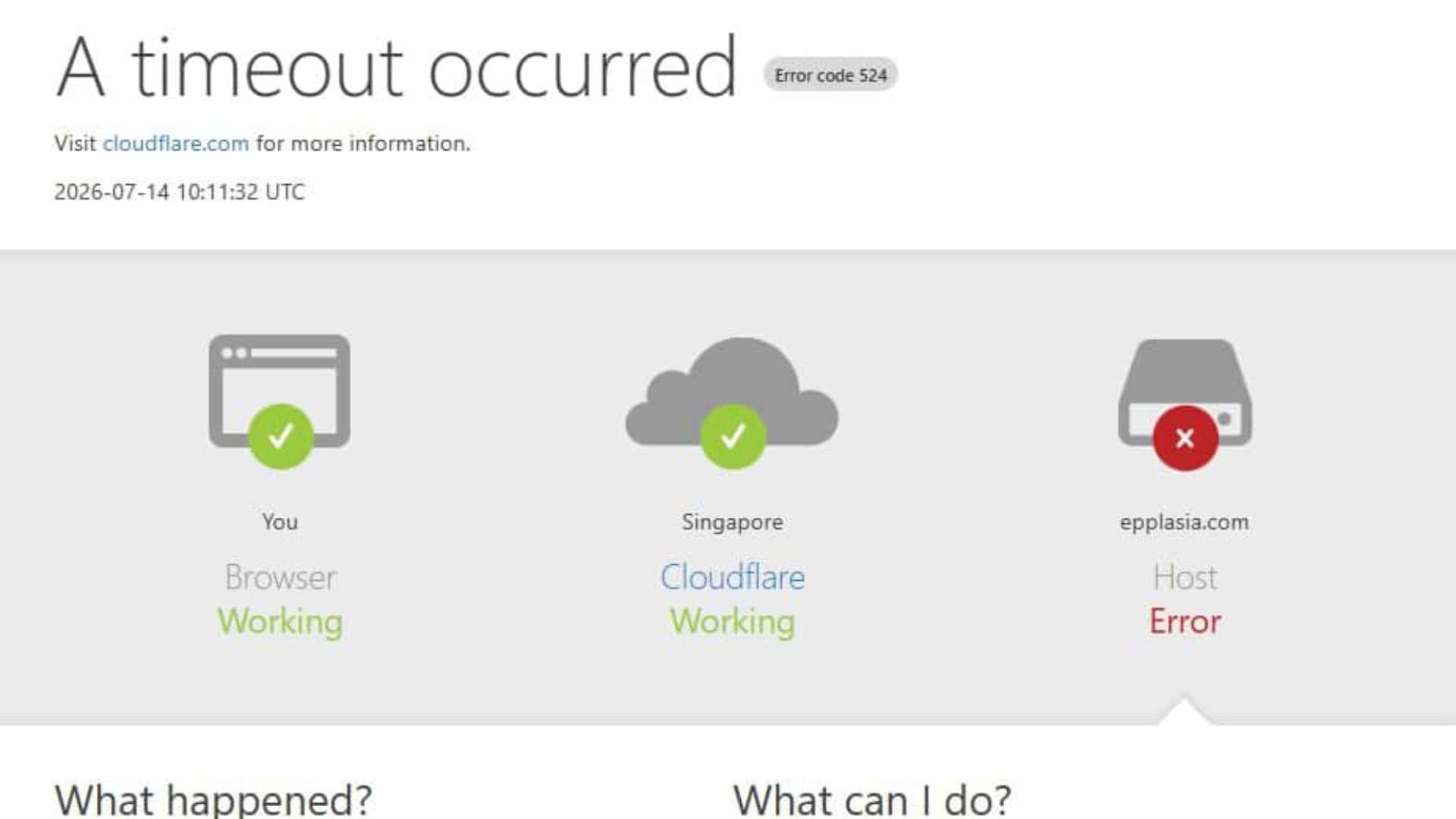
I still had to pay for a higher-tier server, and I also had to pay for the RunCloud subscription. So overall, the savings were not as big as expected. Even worse, the same resource problems (CPU and memory usage overload and timeout at 100%) started appearing again after some time.
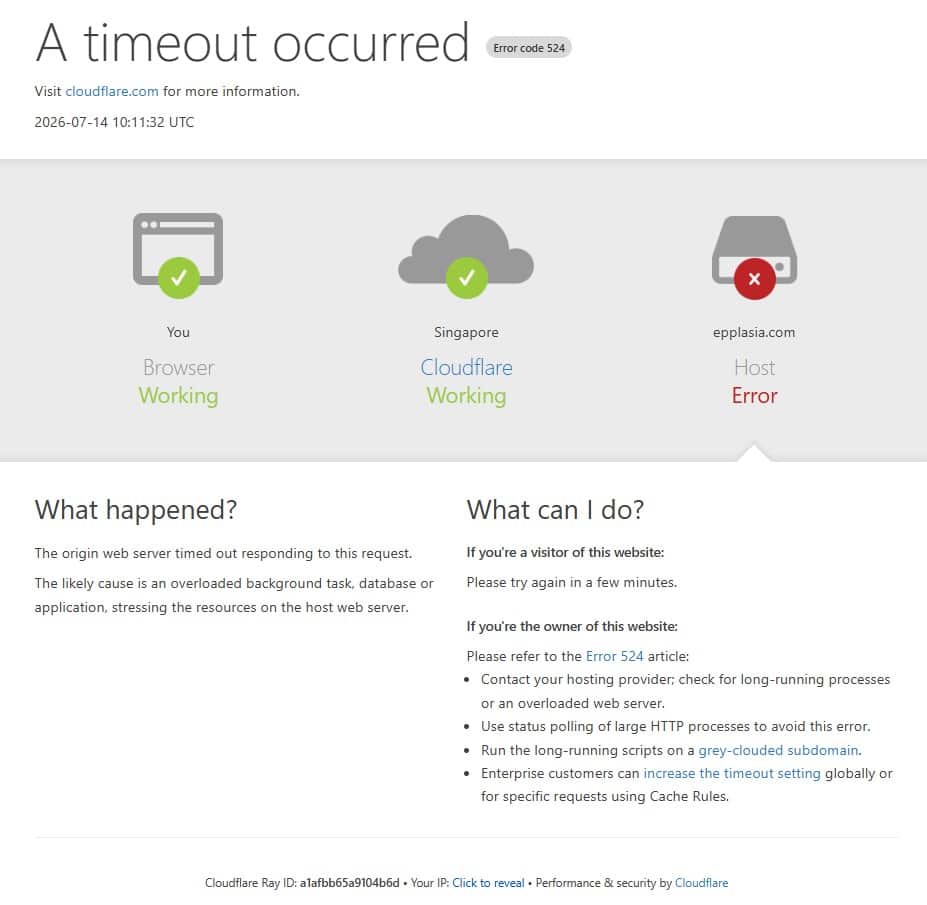
That was the frustrating part.
I spent far too much time debugging, optimizing, checking plugins, reviewing usage, and trying to keep client websites stable. Sometimes I could reduce the issue temporarily, but it never felt permanently solved.
After more checking and research, I also found that even an almost empty WordPress website could still use quite a lot of server resources in that environment. RunCloud itself seemed to consume more resources than I expected too.
I’m not a server engineer, and seriously, I do not want to become one just to keep websites running normally.
That’s when I started looking seriously for a better alternative.
Why I chose Hostinger Cloud Hosting
What made me try Hostinger was the pricing.
At that time, I found a promotion for around USD $364++ for 48 months for their cloud hosting plan. After that, the renewal price shown in my account was USD $19.99 per month.
That was enough for me to test it.
If you want to see the latest plans for yourself, you can check Hostinger’s pricing here.
And to my surprise, the difference was immediate.
After moving over, the same websites that had been giving me trouble started running much more smoothly. CPU and memory usage stayed below 25% most of the time, which was a huge improvement compared to what I was dealing with before.
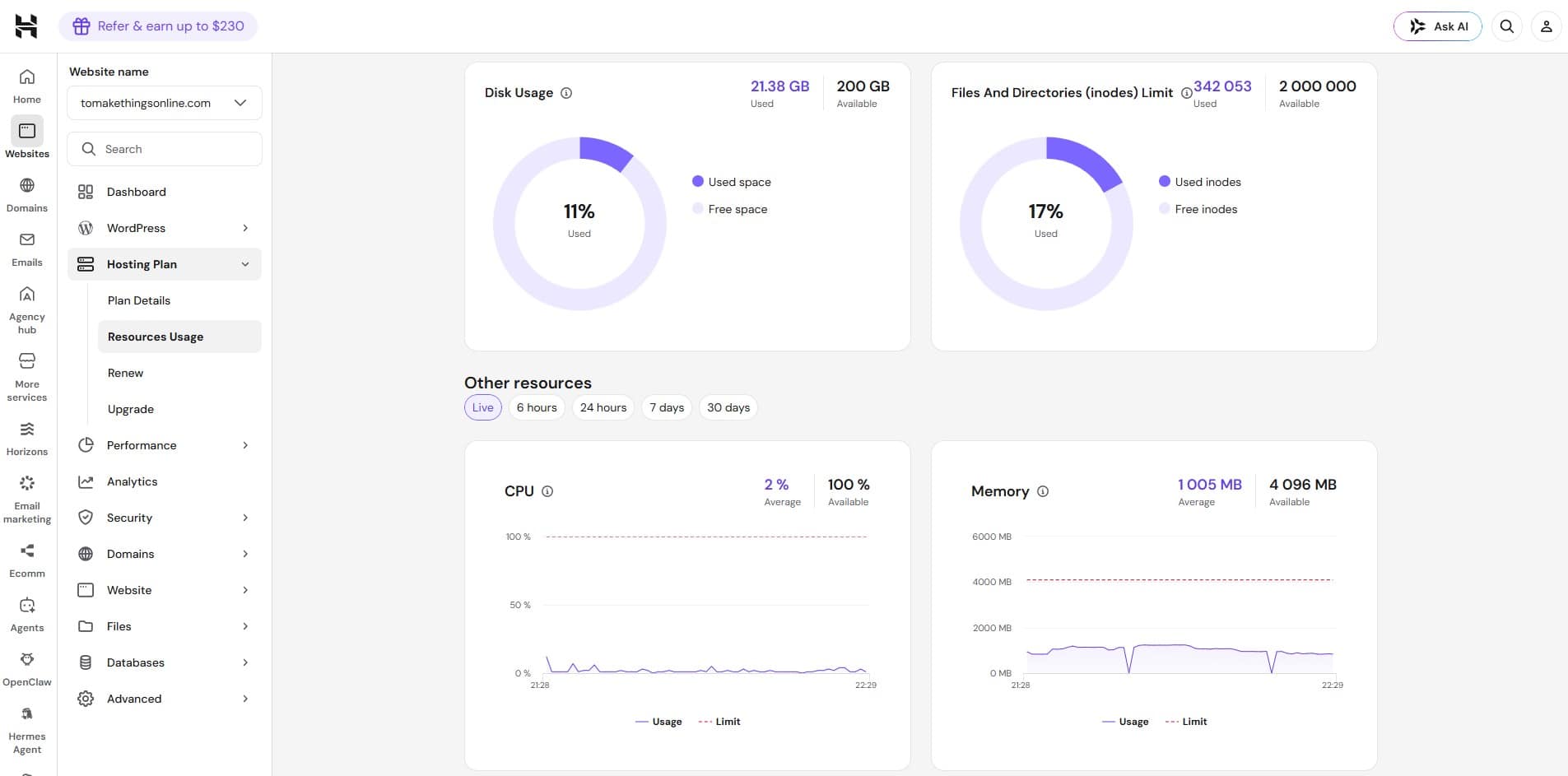
It has now been about a year, and so far I have not run into serious resource limitations.
For me, this translated into two very practical benefits:
- Much lower hosting costs
- Much less time spent fixing server issues
During the first four years, the savings worked out to more than 80% lower monthly cost compared to what I was spending before. Even after renewal, it still looks far more affordable for my use case.
That is the biggest reason why moving from Cloudways to Hostinger has felt worth it.
What improved after moving to Hostinger
The biggest improvement was not just performance. It was peace of mind.
I no longer have to keep wondering whether a website crash means another server upgrade is coming. I no longer need to spend so much time troubleshooting resource spikes or trying to squeeze more performance out of a setup that already feels stretched.
For me, that time savings matters a lot.
The Hostinger Cloud Startup Plan I signed up for also includes:
- CDN
- Daily backups
- AI tools
The CDN and daily backups are useful features to have included.
The AI tools, personally, are not something I care much about. I still have not really used them because they feel more like extra bloat than something essential, especially when they install additional plugins in WordPress.
That said, some users may find value in those tools. They are just not a deciding factor for me.
If you want to look at the plan features directly, here’s the Hostinger pricing page.
Problems I faced after moving to Hostinger
To be fair, Hostinger is not perfect.
While my overall experience has been much better, I still ran into a few issues during migration and account management. If you’re considering Hostinger as a Cloudways alternative, I think it’s important to know both the good and the bad.
1. Font issues after WordPress migration
One of the biggest problems I faced earlier was related to fonts.
After migrating some websites, I noticed the fonts stopped rendering correctly. For example, a page builder might still show Poppins as the selected font, but the website would display a different fallback font instead. -> The font settings appeared unchanged, the actual Poppins font was no longer being loaded properly after the migration.
This happened when I used:
- Hostinger’s auto-migration service
- The All-in-One migration plugin
My workaround at the time was a bit awkward. I had to change the fonts to something random before migration, complete the migration, and then manually switch them back afterward.
It was not ideal, but it worked.
Later on, I started using WPvivid Pro for backup and migrations, and so far it has been fine. So if you are moving a WordPress website to Hostinger, that may be worth trying.
2. Domain pointing and SSL setup can be slow or buggy
The second issue I noticed was with domain pointing and SSL setup.
Sometimes the domain would not connect properly at first. In those cases, I found that removing the Proxy setting from the A record helped. After Hostinger connected the domain successfully, I could turn the proxy back on again.

Compared to Cloudways and RunCloud, Hostinger’s SSL setup feels more automated, which is nice. But the downside is that it can sometimes take hours before everything is ready.
With Cloudways and RunCloud, SSL setup usually took around 30 minutes max for me.
So while Hostinger is simpler in some ways, it does not always feel faster.
3. Collaborator dashboard issues
Another issue I’ve seen is with the collaborator dashboard.
Some of my clients buy their own Hostinger hosting and add me as a collaborator so I can help set up and manage their websites. That setup should be convenient, but sometimes the dashboard behaves strangely.
For example, it will activate “Impersonate mode” when I am managing client’s server.

That mode itself is not the real problem. The more annoying part is that I sometimes get stuck in one account dashboard and cannot switch properly between servers sometimes. *Changing web browser doesn’t work too.
My guess is that it may be a caching issue. When it happens, I usually just have to leave it alone and come back later. Most of the time, it resolves itself after 3 to 4 hours.
It is not a dealbreaker, but it is definitely frustrating when you are managing multiple client environments.
My concern about Hostinger pricing
One thing I am still watching closely is Hostinger renewal pricing.
Like many hosting companies, Hostinger offers very attractive discounts for new users. That is common in this industry. The real question is always what happens later.
I noticed that Hostinger’s prices started rising quite quickly in 2026. Right now, my account still shows a renewal price of USD $19.99 per month, and I hope that remains unchanged.
But I do wonder whether future renewals could eventually increase to USD $27.99 per month or even higher.
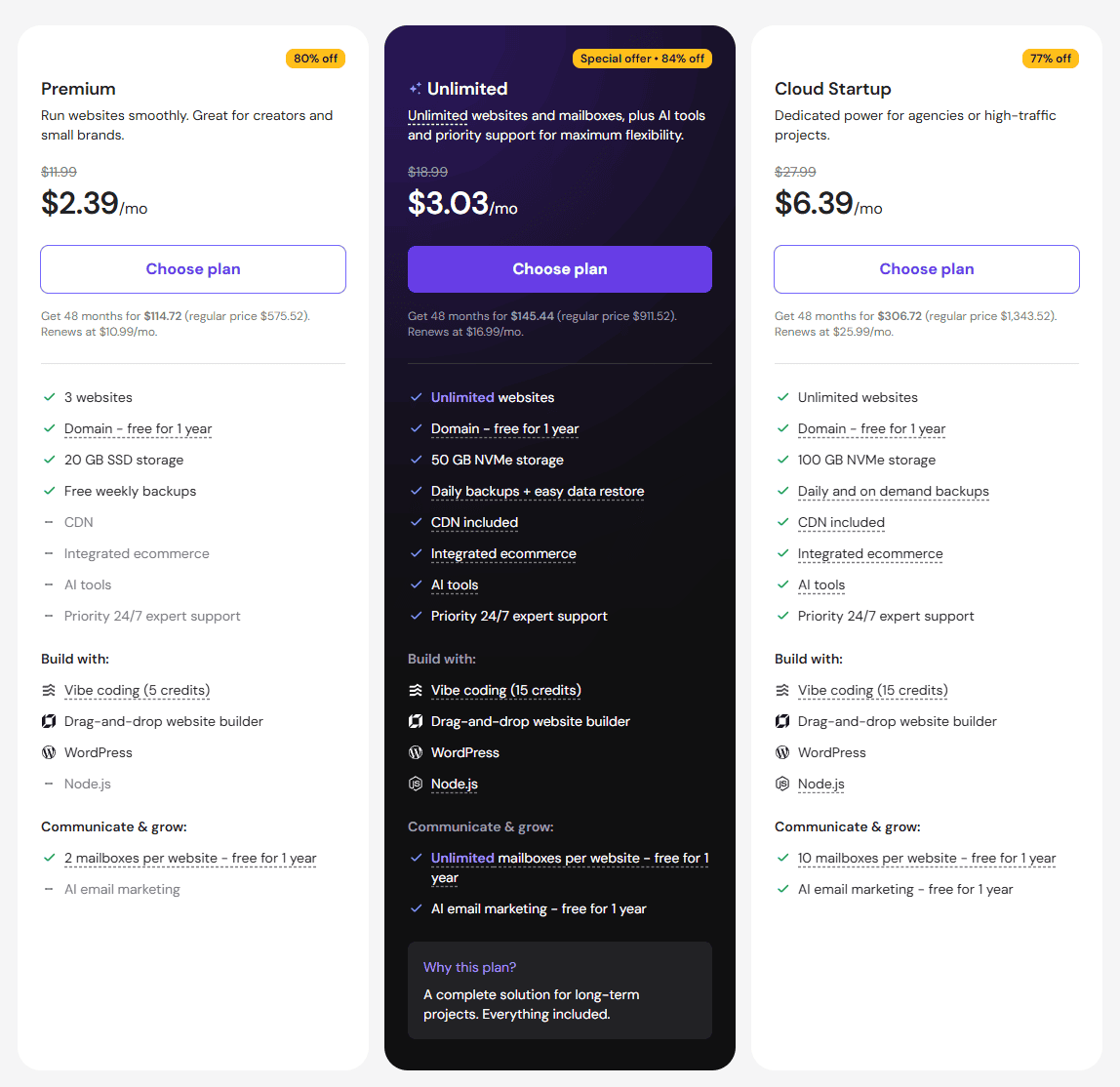
So while Hostinger is still much cheaper for me overall, I think pricing is something you should monitor carefully before committing long term.
If you want to compare the current offer against future renewals, you can check the latest Hostinger pricing here.
Internal migration fees inside Hostinger
This was another surprise.
Hostinger provides free migration when you are moving in from another hosting provider. That part is great.
But if you need to move websites internally between Hostinger servers, such as from your own hosting account to a client’s server, there may be a USD 29 migration fee.
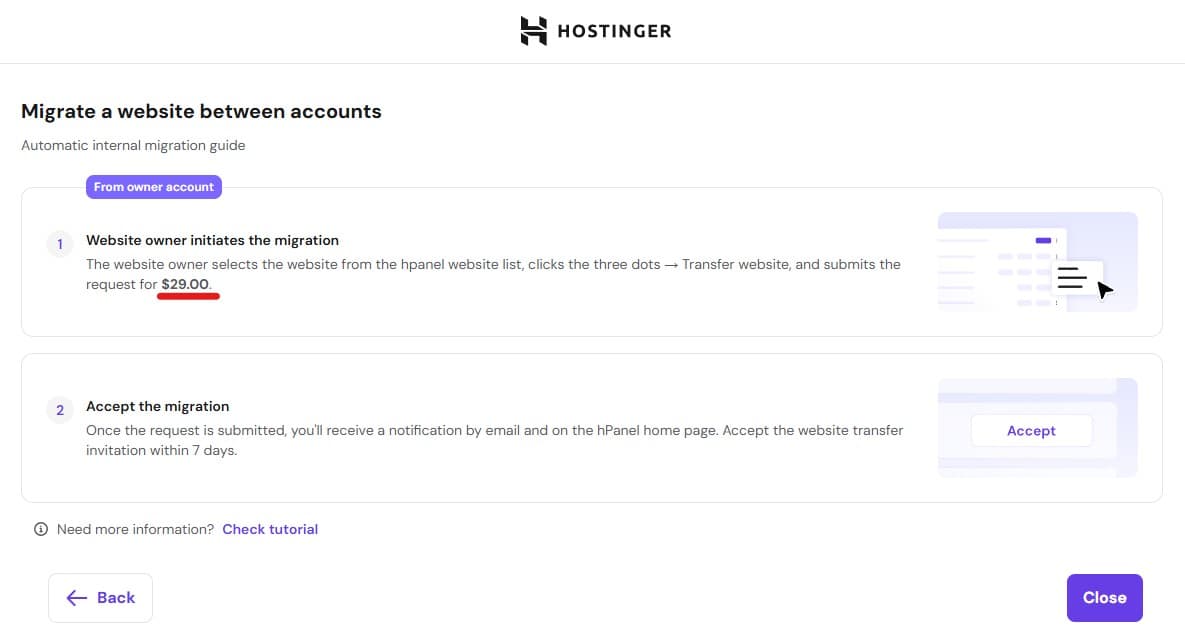
After reading discussions on Reddit, I can understand why this may exist. It could be a way to prevent abuse of discount pricing, such as users repeatedly creating new discounted accounts and shifting sites around internally after each promo cycle.
If Hostinger were assigning a developer or support representative to handle the migration manually, I could understand the reasoning behind the fee and would consider it fair.
Is Hostinger worth it for WordPress hosting?
For me, yes.
If your priority is reducing costs, simplifying server management, and avoiding too much technical overhead, then Hostinger can be a very practical option.
What made the biggest difference for me was that I stopped losing hours to server troubleshooting. That time now goes back into actual client work instead of backend maintenance.
So if you are running WordPress websites for clients, or even just managing a few websites of your own, Hostinger may be worth looking at if your current setup feels too expensive or too demanding.
If that sounds like what you need, you can check Hostinger here.
Will I still use Cloudways?
Tentatively, no.
At my current level of usage, I feel that going back to Cloudways for the same smooth experience would probably cost me around USD $99+ per month, and I do not think that makes sense for me anymore.
That does not mean Cloudways is a bad platform. It just means it no longer fits my current priorities.
Is Cloudways still relevant in 2026?
Yes, I think so.
Even though I moved away from Cloudways, I still think it has a place.
Cloudways is still useful for users who do not want to commit to a long-term hosting contract. That flexibility can be valuable for:
- Short-term marketing campaign websites
- Temporary landing pages
- Test projects
- Client projects with uncertain timelines
For example, larger companies sometimes need a separate website for a short-term marketing campaign. Their internal IT teams may have strict security policies around the main corporate website and internal systems, so getting approval for a new project inside the official environment can take time.
In those situations, a short-term hosting setup on a subdomain can be the faster and easier option. That is where a platform like Cloudways can still make a lot of sense.
So yes, Cloudways is still relevant. It just depends on your use case.
Cloudways vs Hostinger: my final verdict
If I had to sum it up simply:
- Cloudways gave me flexibility
- Hostinger gave me lower cost and less stress
For my needs today, Hostinger wins.
I wanted a hosting setup that was easier to manage, cheaper over the long term, and less likely to drag me into endless performance troubleshooting. So far, Hostinger has delivered that.
It has not been flawless, but the overall tradeoff has still been very worth it for me.
If you already know what you want:
- For a more affordable bundled hosting setup, check Hostinger here.
- For a more flexible cloud hosting setup, check Cloudways here.
Conclusion: was moving from Cloudways to Hostinger worth it?
Yes, it was worth it for me.
After almost 10 years of using Cloudways, I reached a point where the cost and time spent managing server issues no longer felt sustainable. I wanted something simpler, more predictable, and more affordable.
Hostinger gave me that.
The lower cost helped, but the bigger win was reducing the mental load that came with server maintenance. I no longer feel pushed into constant upgrades, constant optimizations, or constant troubleshooting just to keep websites stable.
That matters more than people think.
If you are happy with Cloudways and you value flexibility, short-term hosting, or more control, then there is still a good reason to stay there.
But if you are tired of rising hosting costs, recurring resource issues, and spending too much time fixing things behind the scenes, then moving to Hostinger may be a smart decision.
For me, it was the right move, and I do not see myself going back any time soon.
Frequently Asked Questions
It depends on what you need. In my case, Hostinger was better because it reduced my costs and solved the server resource issues I kept facing. If you want more flexibility and short-term hosting without a long contract, Cloudways may still suit you better.
I left Cloudways mainly because of cost and recurring server resource issues. As more client websites grew, I had to spend more time troubleshooting and upgrading resources, and it no longer felt efficient for my workflow.
From my experience, yes. My WordPress websites have been running smoothly on Hostinger, and I have had fewer resource issues compared to my previous setup. That said, I did face some migration and dashboard issues.
Not all of them. It solved the main problem for me, which was resource usage and cost. But I still faced some issues with domain pointing, SSL delays, and the collaborator dashboard.
Yes, especially if you need hosting flexibility and do not want to commit to a long-term plan. It can still be a good option for short-term business websites, agency projects, or campaign sites.
If you are facing the same problems I had, especially high costs and recurring resource issues, then yes, I think it is worth considering. But your final decision should depend on your own hosting needs and workload.